Version: 1.5.5 (Pro) · Free companion 1.0.9
Requires: WordPress 6.0+, PHP 7.4+, Ultimate Member (required)
Optional: WooCommerce, WooCommerce Subscriptions, FluentCRM, UM User Photos / Groups / Social Activity / Private Messages
Bundled: Action Scheduler (background jobs)
Licensing: Freemius (Pro)
Overview
UM Export Pro is the full member data toolkit for Ultimate Member. Export and import members as CSV or Excel, enrich rows with WooCommerce and FluentCRM, run large jobs in the background, schedule automatic delivery (email, Dropbox, Google Sheets, webhook), and store finished files on local disk or Amazon S3.
Open the top-level UM Export menu in WordPress admin:
- Export — build filters, choose columns, download or automate
- Import — bulk CSV create / update with mapping rules
- Storage — local disk or Amazon S3 for finished files
- Deliveries — Dropbox and Google Sheets credentials for scheduled sends
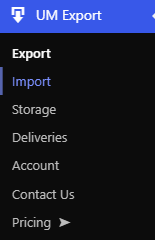
Left sidebar showing the UM Export top-level menu with Export, Import, Storage, and Deliveries.
Requirements
| Requirement | Notes |
|---|---|
| WordPress 6.0+ | Tested up to 6.9 |
| PHP 7.4+ | |
| Ultimate Member | Required — menus and handlers do not register without it |
| WooCommerce | Optional — commerce filters and columns |
| WooCommerce Subscriptions | Optional — subscription filters and columns |
| FluentCRM | Optional — CRM filters and columns (needs FluentCRM tables) |
| UM User Photos / Groups / Social Activity / Private Messages | Optional — extra export column groups when those extensions are present |
| Action Scheduler | Bundled; used for background export/import chunks |
| WP-CLI | Optional — scripted export/import (Pro only) |
All admin screens and AJAX actions require the manage_options capability. Creating users on import additionally needs create_users.
Installation
- Install and activate Ultimate Member.
- Upload and activate UM Export Pro Premium.
- Complete Freemius activation if prompted.
- Open UM Export in the WordPress admin sidebar.
If both the free plugin (UserElements Member Export for Ultimate Member) and Pro are installed, Pro takes over: Free disables its menus and handlers and shows a notice linking to admin.php?page=um-export. Free can remain installed; it does not auto-deactivate.
Export
Path: UM Export → Export. A 3-step wizard with a sticky footer (Back / Preview first 25 rows / Continue / on step 3: format + Download now).
Step 1 — Target & filters
Filters are grouped in collapsible sections. Empty groups are ignored. Active filters appear as summary chips at the top.
Basics
- User role — any registered WordPress role, or all roles
- Account status — Approved, Pending administrator review, Waiting email confirmation, Rejected, Inactive
- Registration date — Last 7 / 30 / 90 days, or custom date range
Engagement & profile
- Inactive users — no login in last 30 / 60 / 90 days (uses
_um_last_login) - Missing profile field — users without a specific discovered meta key filled in
- Profile updated date range — members whose
_um_export_last_modifiedstamp falls in a window (stamped on register, profile update, and relevant Woo order events)
WooCommerce (when WooCommerce is active)
- Minimum orders and minimum total spent
- Purchased product (searchable product picker, completed/processing orders)
- Last order date range
- Billing country
- Active subscription yes/no (WooCommerce Subscriptions)
- Active subscription on a specific product (Subscriptions)
FluentCRM (when FluentCRM is active)
- CRM status — subscribed, unsubscribed, bounced, complained, pending
- Has tag / does not have tag
- In list
- Not in FluentCRM — members with no CRM contact record
Custom field rules
Stack multiple AND rules on user meta:
- Equals / Not equals
- Contains (including multi-select)
- In list / Not in list (comma-separated)
- Between (value:
min,max) - Greater than / Less than
- Has any value / Has no value
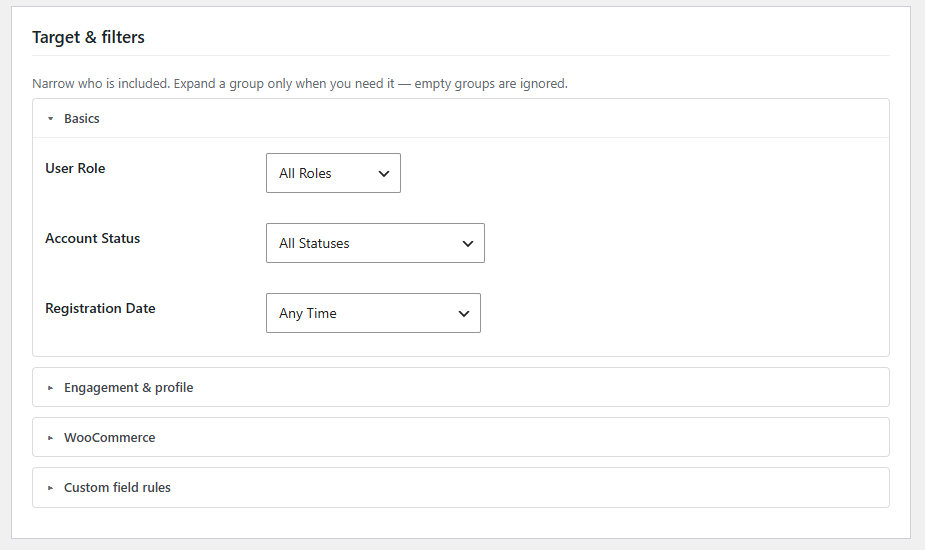
Step 1 with two filter groups expanded and summary chips at the top.
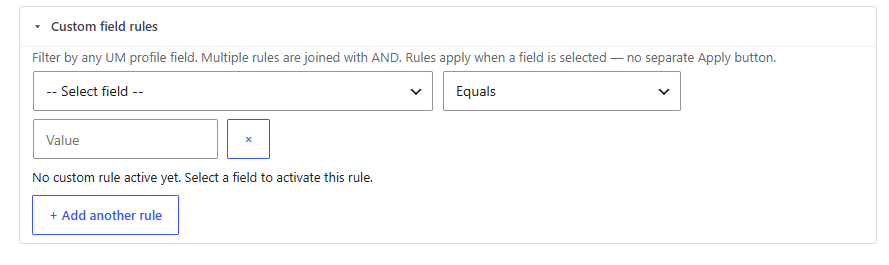
Custom rules with 2+ rules and “+ Add another rule”.
Presets
- Suggested starters (when none saved): All members, Incomplete profiles, WooCommerce customers (if Woo active)
- Saved presets: load, update, or save as new; delete named filter + column + media-mode sets
- Clear Field Cache — refreshes the discovered meta key list (SQL discovery is capped at 2,000 keys)

Preset dropdown with an active chip, or suggested-starter buttons when empty.
Step 2 — Columns
Two-panel layout: available fields on the left, selected columns on the right with drag-to-reorder. Select all / deselect all visible; searchable UM custom fields.
Basic Details: ID, Name, Email, Role, Username, Display Name, Registered Date, Profile Photo (URL), Cover Photo (URL)
First name, last name, nickname, description, phone, and other profile meta appear under Ultimate Member custom fields (and are exportable via allowlist).
WooCommerce: Total Orders, Total Spent, Last / First Order Date, Average Order Value, Last Active, Has Active Subscription, Subscription Next Renewal Date
FluentCRM: Status, Contact ID, Tags
UM Media Extensions (when available): Gallery album count, gallery photo URLs, groups count, activity photo URLs
UM Messaging (when Private Messages tables exist): Conversation count, messages sent/received, unread count, last message at
Ultimate Member custom fields: Searchable list from discovered user meta. Advanced/technical meta is behind a collapsible “Advanced / technical fields” gate.
Live preview: First 25 rows plus total match count (sticky footer “Preview first 25 rows”).
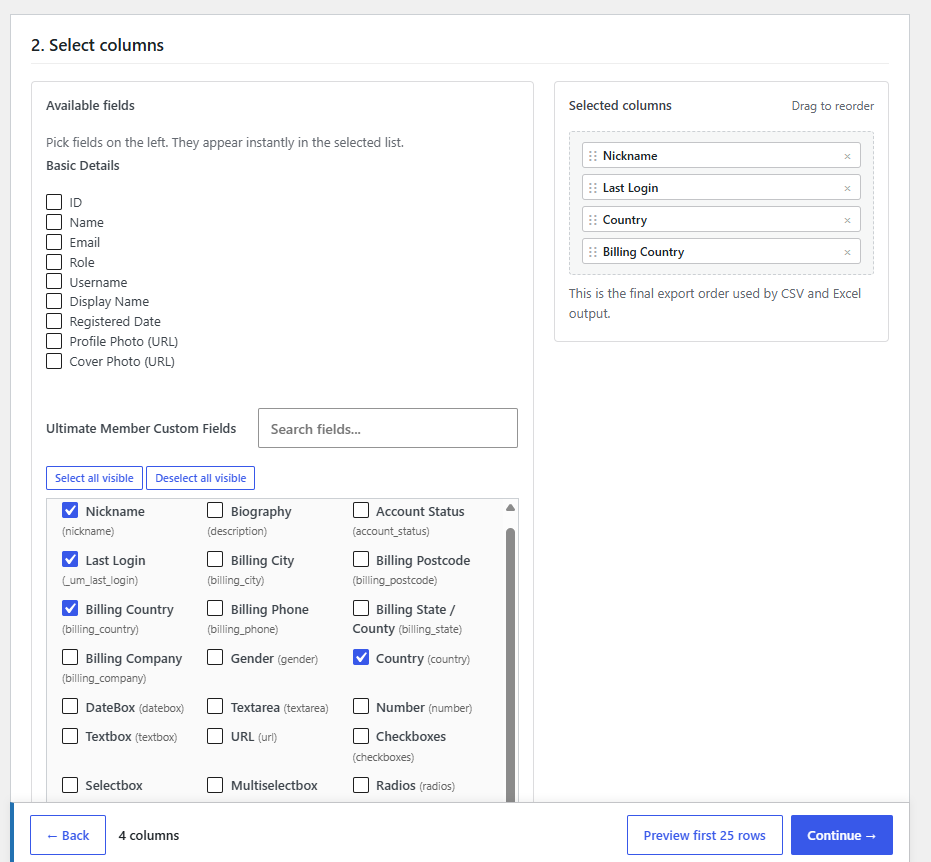
Step 2 with selected columns on the right and the UM custom field search box.
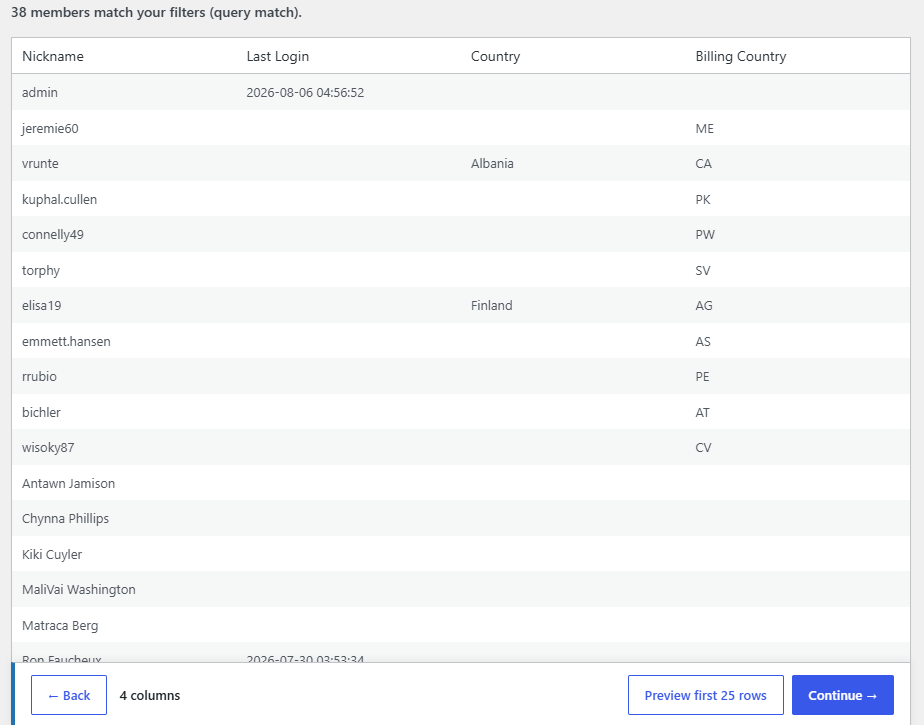
Preview table showing “25 of X matching members”.
Step 3 — Review & export
Summary card
Who (filter summary), columns (count + list), and format.
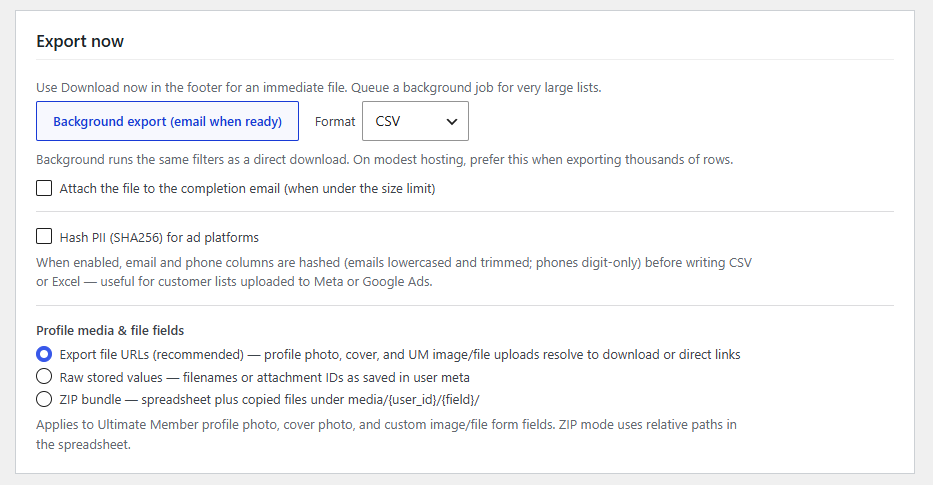
Export now
- Download now (sticky footer) — immediate CSV or Excel (.xlsx)
- Background export (email when ready) — chunked via Action Scheduler (500 users per chunk). Recommended for thousands of rows. Completion email includes a secure download link (default 7 days). Optional: attach the file when under the size limit (default 15 MB).
- Hash PII (SHA256) — hashes email columns (lowercased/trimmed) and phone columns (digits only) for Meta / Google Ads customer lists. Default email keys:
email,user_email; phone keys:phone_number,billing_phone.
Profile media & file fields
- Export file URLs (default) — profile/cover/UM file fields resolve to links
- Raw stored values — filenames or attachment IDs as saved in meta
- ZIP bundle — spreadsheet plus copied files under
media/{user_id}/{field}/(relative paths in the sheet)
Save & automate
- Save or update a named preset (required before scheduling)
- Send this member list automatically:
- How often: Every day, Every hour, Once a week
- File type: CSV or Excel (.xlsx)
- Destinations (multi-select):
- Email a download link (scheduled links expire in 24 hours)
- Email the file as an attachment
- Save a copy to Dropbox (connect under Deliveries; default folder
/UM-Exports) - Update a Google Sheet (CSV schedules only; Spreadsheet ID + tab; replaces from A1; share sheet with the service account email)
- Webhook URL (optional) — Zapier, Make, or custom HTTPS endpoint
- Only new or updated members (delta) — uses
_um_export_last_modifiedsince last successful run - Embed rows in webhook — first 50 CSV rows as JSON in the POST body (CSV only)
- Send now — trigger an immediate scheduled run
Activity
- Background downloads — Queued / Running / Complete / Failed / Canceled; cancel while queued; download when complete
- Automatic sends — schedule list with last run, row count, and delivery status (email / Dropbox / Sheets / webhook)
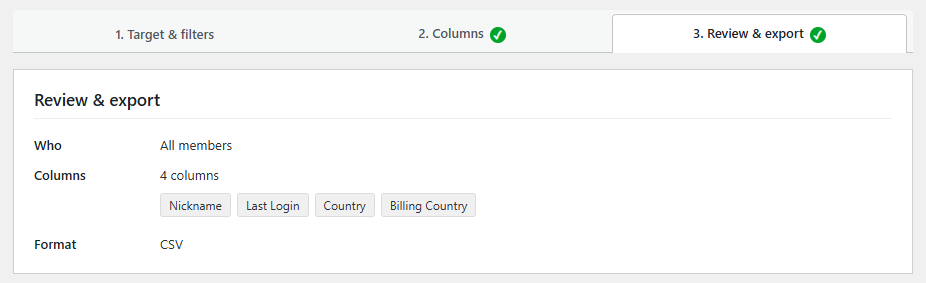
Summary card, Export now, Hash PII, and media mode radios.
Expanded “Send this member list automatically” panel with destinations, Dropbox folder, Google Sheet fields, webhook, delta, embed rows.
Webhook payload example
{
  "schedule_id": "monthly-members",
  "template_name": "Monthly Members",
  "row_count": 412,
  "download_url": "https://yoursite.com/wp-admin/admin-ajax.php?action=um_export_download_secure&token=…",
  "expires_in": "24 hours",
  "storage_provider": "local",
  "object_key": "…",
  "rows_limit": 50,
  "rows_included": 3,
  "rows_truncated": false,
  "rows": [
    { "Email": "member@example.com", "First Name": "Alex" }
  ]
}
Empty scheduled exports delete the generated file and skip delivery.
Import
Path: UM Export → Import. 3-step wizard (?step=1|2|3) plus an import history / background jobs list.
Step 1 — Upload
- UTF-8 CSV with a header row
- Import mode: Create or update (upsert), Create only, or Update only
- Match key: Email, Username, or User ID
- Optional import preset for saved mapping + rules
📸 Screenshot 11 — Import upload
File upload, mode radios, match-key dropdown, optional preset selector.
Step 2 — Map columns
- Auto-mapping from CSV headers (round-trip friendly with UM Export files)
- Per-column on-update rules: Default, Skip if blank, Always overwrite, Never update
- Fields to update: all mapped fields, only these fields, or all except selected fields
- Save mapping as an import preset
- Readonly / non-importable: computed columns such as Name, Profile Photo, and enricher fields
📸 Screenshot 12 — Column mapping
Mapping table: CSV column, sample value, mapped field, per-field update rule.
Step 3 — Preview & run
- Dry-run preview — first 25 rows with create / update / skip / error estimates
- Run import now — synchronous (small files)
- Run in background — recommended when session rows > 50; chunks of 100 rows; email when complete
Import options:
- Send password reset email when a new password is set
- Skip blank cells on update (default on)
- Suppress UM / WordPress new-user notification emails
- Role strategy: replace roles vs add without removing existing
Pro has no hard row cap. Background imports can be canceled from the history UI.
📸 Screenshot 13 — Dry-run preview
Preview table with create / update / skip per row.
📸 Screenshot 14 — Import results
Created / Updated / Skipped summary and optional error list.
📸 Screenshot 15 — Background import modal
Progress modal with rows processed.
Storage
Path: UM Export → Storage
Background exports write locally first; the selected provider then takes over for durable storage and download links.
| Setting | Description |
|---|---|
| Provider | Local disk (default) or Amazon S3 |
| AWS region | e.g. us-east-1 |
| Bucket | S3 bucket name |
| Access key / Secret | Or lock via wp-config.php constants |
| Object prefix | e.g. um-exports/ |
| Delivery domain | Optional CloudFront / CDN for public-read objects |
| Object ACL | Private (signed URLs, recommended) or public-read |
| Local cleanup | Delete local copy after successful S3 upload |
Use Test connection to validate S3 credentials.
Download link expiry:
- Manual background jobs → default 7 days
- Scheduled email links → 24 hours
- Private S3 objects resolve through a short-lived presigned URL (~1 hour) after the token is redeemed
Local cleanup cron: daily job removes aged CSV/XLSX artifacts older than ~30 days.
wp-config.php constants:
define( 'UM_EXPORT_STORAGE_PROVIDER', 's3' );
define( 'UM_EXPORT_AWS_ACCESS_KEY_ID', 'AKIA...' );
define( 'UM_EXPORT_AWS_SECRET_ACCESS_KEY', '...' );
define( 'UM_EXPORT_AWS_BUCKET', 'my-exports-bucket' );
define( 'UM_EXPORT_AWS_REGION', 'us-east-1' );
📸 Screenshot 16 — Storage settings
Provider radios, S3 fields, ACL, Test connection.
📸 Screenshot 17 — Export ready email
Background-export completion email with the secure download link.
Deliveries
Path: UM Export → Deliveries
Connect cloud destinations once, then enable them per scheduled preset.
| Destination | Setup |
|---|---|
| Dropbox | App with files.content.write; paste access token. Per-schedule folder path (default /UM-Exports). |
| Google Sheets | Service account JSON (Sheets API enabled). Share each spreadsheet with the service account email as Editor. CSV schedules replace data from A1. |
Use Test connection for Dropbox or Google auth. Credentials can also be locked in wp-config:
define( 'UM_EXPORT_DROPBOX_ACCESS_TOKEN', 'sl....' );
define( 'UM_EXPORT_GOOGLE_SERVICE_ACCOUNT_JSON', '{...}' );
📸 Screenshot 18 — Deliveries
Dropbox token field, Google service-account JSON, Test connection.
WP-CLI (Pro)
Export:
wp um-export run --preset=all-members
wp um-export run --preset=monthly --format=xlsx --background
wp um-export job list
wp um-export job status cli_abc123xyz
Import:
wp um-import run --file=/path/to/members.csv --mode=upsert --match=user_email
Flags: --format=csv|xlsx, --mode=create|update|upsert, --match=user_email|user_login|id. CLI import is synchronous (auto-maps headers).
Use cases
1. Monthly board report (Excel)
- Step 1: Status = Approved, Registration = Last 30 days
- Step 2: ID, Name, Email, Role, Registered Date (+ first/last name from custom fields if needed)
- Step 3: Download now → Excel (.xlsx)
2. Churn-risk re-engagement
- Engagement: Inactive = 90 days
- Columns: Email, Name, and last-login related meta if present
- Use background export for large lists
3. High-value WooCommerce segment
- Woo filters: min orders, min spend, billing country, purchased product
- Columns: Email, Total Orders, Total Spent, Last Order Date
- Save preset → schedule weekly email to marketing
4. FluentCRM / Zapier delta sync
- Filter approved members (or a tag-specific subset)
- Save preset → schedule daily
- Add Zapier webhook URL
- Enable delta sync + Embed rows in webhook
5. Incomplete profile cleanup
- Suggested preset Incomplete profiles, or set Missing profile field
- Export Email, Name, Account Status
6. Meta / Google Ads hashed audience
- Filter target segment; columns Email (+ phone if available)
- Enable Hash PII (SHA256)
- Export CSV → Ads Manager
7. Site migration (export → import)
Source: Export all members with UM custom fields → background export → download CSV.
Destination: Import → auto-map → upsert by email → background import.
8. Bulk profile update from spreadsheet
- CSV: email, job_title, company
- Mode = Update only, match = email
- Email = Never update; other fields = Always overwrite
- Update only selected fields
9. S3-backed compliance archive
- Storage → S3 with private ACL
- Daily scheduled preset with email link backup
- Optional: delete local copy after S3 upload
10. Dropbox + Google Sheets ops report
- Deliveries → connect Dropbox token and Google service account
- Save a CSV preset; enable Dropbox folder + Google Sheet destinations
- Share the sheet with the service account email
- Schedule daily or use Send now
11. Media ZIP for offsite backup
- Select profile/cover/file columns
- Media mode = ZIP bundle
- Background export for large member bases
12. CLI-driven nightly export
0 2 * * * cd /var/www/site && wp um-export run --preset=nightly-backup --format=csv --background
Free vs Pro
Free lives under the Ultimate Member submenu. Pro registers its own top-level UM Export menu. When Pro is active, Free yields completely.
| Feature | Free (1.0.9) | Pro (1.5.5) |
|---|---|---|
| Admin location | Under Ultimate Member | Top-level UM Export |
| CSV export / import | Yes | Yes |
| Excel (.xlsx) | No | Yes |
| Export row limit | 2,000 | Unlimited (+ background) |
| Export presets | Max 3 | Unlimited |
| Import row limit | 500 | Unlimited (+ background) |
| Import modes | Upsert, Create only | Upsert, Create only, Update only |
| Match keys | Email, Username | Email, Username, User ID |
| Per-field import update rules | No | Yes |
| Import presets | No | Yes |
| S3 storage | No (local only) | Yes |
| Deliveries (Dropbox / Sheets) | No | Yes |
| WooCommerce enrichment & filters | No | Yes |
| FluentCRM enrichment & filters | No | Yes |
| UM Photos / Groups / Activity / PM columns | No | Yes (when extensions present) |
| Custom meta rule builder | No | Yes |
| Inactivity / missing field filters | No | Yes |
| Background export / import | No | Yes |
| Scheduled email / Dropbox / Sheets / webhook | No | Yes |
| Delta sync | No | Yes |
| PII hashing | No | Yes |
| Media URL / raw / ZIP modes | No | Yes |
| WP-CLI | No | Yes |
Security
manage_optionson all admin actions (import create also needscreate_users)- Nonces on form submissions and AJAX
- Export columns validated against a server-side allowlist
- CSV formula-injection hardening (cells starting with
= + - @/ tab / CR) - Time-limited secure download tokens; path confinement under the storage directory
- Webhook URLs must resolve to public IPs (SSRF protection)
- S3 and delivery secrets can be locked via wp-config.php constants
- Optional SHA256 hashing for ad-platform uploads
- Upload/storage dirs hardened with
index.php+.htaccessdeny rules
Developer notes
Useful filters/actions include: um_export_exportable_columns, um_export_pii_email_columns, um_export_pii_phone_columns, um_export_webhook_max_rows, um_export_email_attachment_max_bytes, um_export_storage_settings, um_import_importable_columns, um_import_row_data, um_import_before_user_save, um_import_after_user_save, um_export_delivery_complete.
Background chunk sizes: export 500 users; XLSX finalize stages in 5,000-row batches; import 100 rows.
Troubleshooting
| Issue | Fix |
|---|---|
| “Requires Ultimate Member” / missing menus | Activate Ultimate Member |
| Free UI disappeared | Pro is active — use UM Export top-level menu |
| Action Scheduler error | Ensure Pro is active; check for AS conflicts with other plugins |
| Missing custom fields | Clear Field Cache; site may have hit the 2,000 meta key discovery limit |
| Preset columns dropped warning | Re-save preset with currently allowlisted columns |
| Large export times out | Use Background export |
| Webhook not firing | Public HTTPS URL; host must not resolve to private IPs |
| S3 test fails | Region, credentials, bucket IAM (PutObject / GetObject / Delete as needed) |
| Dropbox / Sheets disabled in schedule UI | Connect credentials under Deliveries and Test connection |
| Google Sheet empty / permission error | CSV format only; share sheet with service account email as Editor |
| Import auto-map misses columns | Manually map in Step 2 |
| Free: export blocked at 2,000 / import at 500 | Narrow filters or upgrade to Pro |