Today we’re launching CartCue Pro – Sales Automation for WooCommerce, the plugin we built to answer a frustration we kept hearing from store owners: “I know I’m leaving money on the table, but I don’t have time to babysit my marketing.”
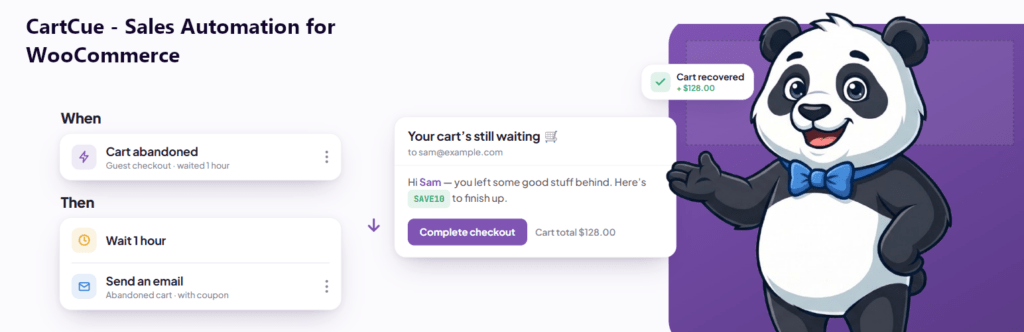
Carts get abandoned at 2 a.m. Payments fail silently. First-time buyers never hear from you again. Subscriptions lapse without a single follow-up. Every one of those moments is recoverable revenue, but only if something is watching for it and acting the instant it happens.
That “something” is CartCue. You set it up once, and it works the room while you focus on the parts of the business only you can do.
The core idea: think in Plays, not flowcharts
Most automation tools hand you a blank canvas and a box of connectors and wish you luck. You end up staring at a tangle of nodes wondering whether your “abandoned cart” branch actually fires.
CartCue is built around a single, plain-English sentence:
WHEN something happens → IF these conditions are true → THEN do this.
We call each of these a Play, an automated moment that runs in the background. A Play reads like a sentence you’d say out loud:
- When a cart is abandoned → if the cart is over $50 → then email a 10%-off coupon, and follow up in 5 days if they haven’t bought.
- When a payment fails → then email the customer a one-click payment link and post an alert to Slack.
- When a first order is paid → then send a welcome email, tag the customer in FluentCRM, and ask for a review three days later.
No node soup. You build the sentence, CartCue runs it. That mental model is the whole point, anyone on your team can open a Play and understand exactly what it does and why.
What CartCue Pro actually does
Under the hood, every Play is assembled from three libraries: triggers (the WHEN), rules (the IF), and actions (the THEN). CartCue Pro ships with a deep set of each, all native to WooCommerce.
The WHEN – 27 triggers that watch your store
CartCue listens for the events that actually matter to a store’s revenue, including:
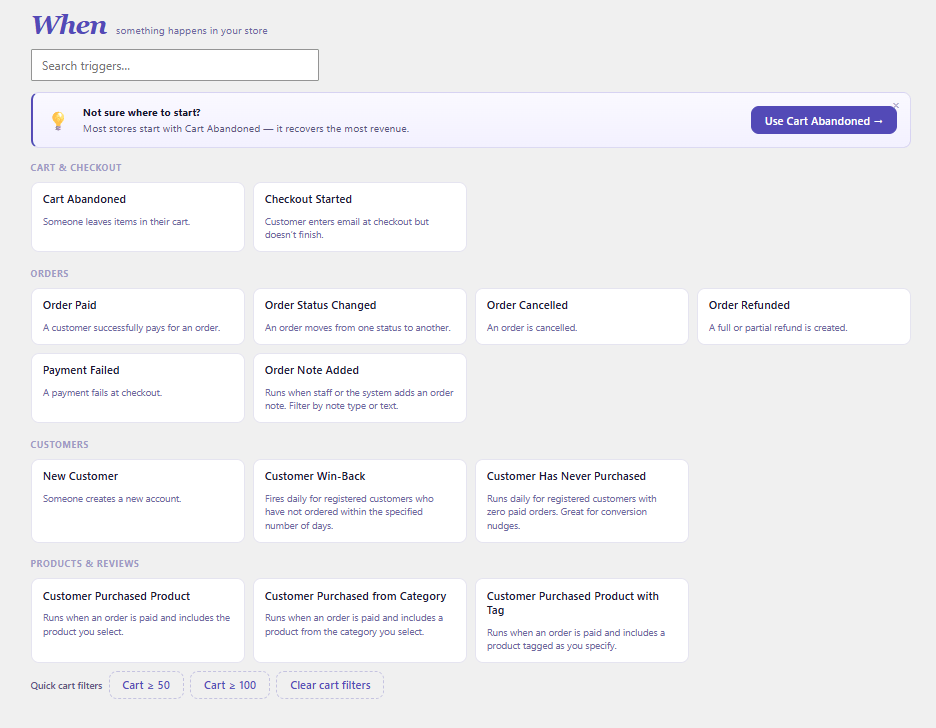
- Cart & checkout: cart abandoned, checkout started
- Orders: order paid, payment failed, order status changed, refunded, cancelled, order note added
- Customer lifecycle: new customer, never purchased, win-back (lapsed buyer), birthday
- Products: purchased a specific product / category / tag, product stock low
- Reviews: new review (great for catching a 1-star before it festers, or thanking a 5-star)
- Subscriptions (full lifecycle): cancelled, expired, paused, reactivated, renewal milestones (e.g. their 6th renewal), saved card expiring
- Manual & inbound: run a Play on demand against a segment, or fire one from an inbound webhook
Crucially, CartCue only attaches its hooks to WooCommerce for triggers that an active Play is actually using. An idle trigger costs you nothing on the front end.
The IF – 22 rules to target the right people
A trigger fires for everyone; rules decide who’s worth acting on. CartCue Pro lets you gate any Play on conditions like:
- Order total, currency, payment method, status, or whether it used a coupon
- Whether the order contains a specific product or category
- Whether it’s the customer’s first order
- Customer lifetime spend, average order value, order count, account age, days since last order
- Whether the customer has purchased a given product before
- Whether they hold an active subscription
- Whether they opened or clicked a previous email in the Play
This is what turns “blast everyone” into “reward my VIPs and win back the people who actually drifted away.”
The THEN – 17 actions across every channel that matters
Once a Play matches, CartCue can act far beyond just sending an email:
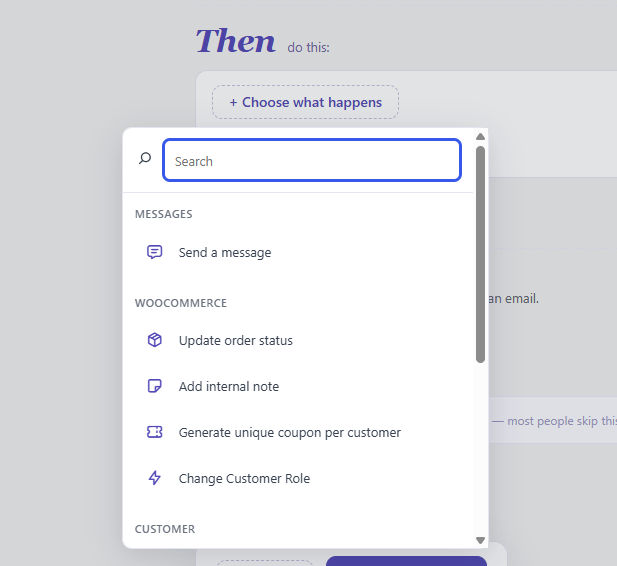
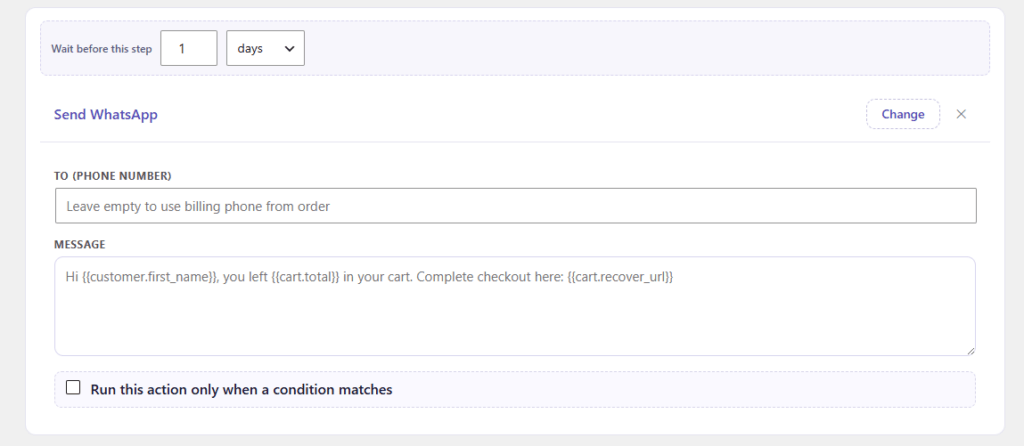
- Messaging: branded email, SMS (Twilio or Vonage), WhatsApp, Slack notifications
- Incentives: generate single-use coupons on the fly with custom prefixes, expiry, and usage limits, a unique code per customer, baked right into the email
- WooCommerce-native moves: change order status, add an order note, change a customer’s role, grant or cancel a WooCommerce membership, add or remove loyalty points
- CRM & list management: add/remove customer tags, sync contacts and tags to FluentCRM, Mailchimp, MailPoet, ActiveCampaign, and Klaviyo
- Plumbing: fire an outgoing webhook to anything, or trigger another Play to chain workflows together
Multi-step sequences with real branching
Plays aren’t one-shot. A Play can be a timed sequence, email now, wait two days, then a second nudge, then a coupon only if they still haven’t opened anything. CartCue supports genuine If/Else branch steps mid-sequence (e.g. “did they open the last email? → if yes, stop; if no, escalate”), plus per-step waits measured in minutes, hours, or days.
Timing is flexible too: send immediately, after a delay, at a specific time of day (optionally only on certain weekdays, no 3 a.m. sends), or hold until a chosen date.
Start in minutes with 25 ready-made recipes
You don’t start from a blank page. CartCue Pro ships with 25 prebuilt Plays you can install and customize in a couple of clicks, spanning the categories that drive the most revenue:
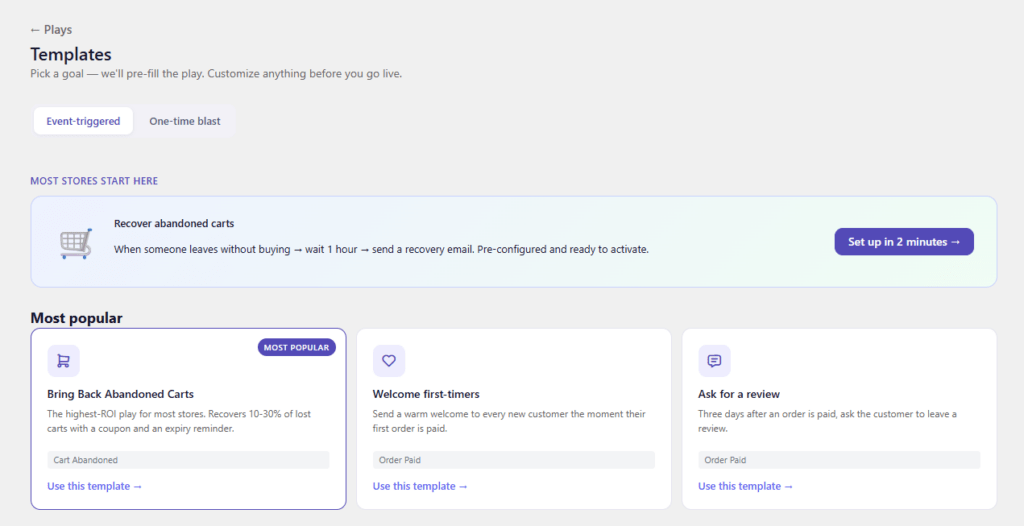
- Recover: abandoned cart (single-shot and escalating), failed payment recovery, subscription expiry offers
- Post-purchase: welcome first-timers, order-preparing / processing / shipped updates, cross-sell, a 5-step post-purchase lifecycle
- Loyalty: ask for a review, reward reviewers, thank positive reviewers, recover from negative ones, VIP unlock
- Win-back & subscriptions: lapsed-customer win-back, 6-month subscriber reward, saved-card-expiring warnings, a 5-email welcome series
- Integrations: auto-sync buyers into FluentCRM, Mailchimp, or MailPoet
The flagship cart-recovery recipe alone is positioned to recover a meaningful share of otherwise-lost carts with a coupon plus an expiry reminder.
Emails that look like you, with live data
CartCue includes a block-based email builder and a merge-tag system, so every message is personalized with real order data: {{customer.first_name}}, {{cart.items}}, {{cart.recover_url}}, {{coupon.code}}, {{order.tracking_link}}, {{order.cross_sells}}, {{review.rating}}, and more. The coupon you generate in step one drops straight into the email in step two.
Reporting that ties automation to dollars
Every Play tells you whether it’s working:
- Revenue attribution – see how much each Play actually recovered or generated, not just how many emails it sent
- Open and click tracking per Play
- Per-Play step performance – a chart showing how each step in a sequence performs, plus recent customer activity
- Execution logs so you can see exactly what ran, what was skipped, and why
How CartCue is different from other automation plugins
There are plenty of WooCommerce marketing and “follow-up email” plugins. Here’s where CartCue takes a different path.
1. It’s WooCommerce-native, not a CRM with a WooCommerce adapter bolted on. CartCue speaks WooCommerce directly, orders, subscriptions, memberships, points, roles, coupons, HPOS (the new High-Performance Order Storage). It isn’t a general email tool that happens to read your store; it manipulates the store itself. Changing an order status, granting a membership, or minting a per-customer coupon are first-class actions, not afterthoughts.
2. The “Plays” model is readable by humans. The WHEN → IF → THEN sentence structure means a non-developer can open any automation and understand it instantly. Compare that to flowchart builders where the logic is spread across a dozen connected boxes. Simplicity here is a feature, not a limitation, the branching and sequencing are all there when you need them.
3. Deliverability guardrails most competitors simply don’t have. This is the part store owners discover the hard way with other tools. CartCue ships with protection against over-messaging built into the engine:
- Quiet hours – never send during the window you set (e.g. 9 p.m.–8 a.m.)
- A global email cap – a hard ceiling on total automated emails per customer so multiple Plays can’t gang up on one person
- Per-Play frequency limits and cooldowns – “max once per customer,” “wait 30 days between runs”
- Recheck-before-run – before sending that abandoned-cart email an hour later, CartCue re-checks that the cart is still abandoned, so it never nags someone who already bought
- Consent and one-click unsubscribe built in, with marketing-consent capture at checkout and SMS consent handling, plus unsubscribe-reason tracking
Most “send a follow-up” plugins will happily email a customer who already completed their purchase. CartCue is designed specifically not to.
4. It’s built to run reliably at scale. CartCue uses WooCommerce’s Action Scheduler for all delayed and sequenced steps, with proper retry handling and a notion of non-retryable failures so a single bad address doesn’t jam your queue. Trigger hooks register only for triggers that active Plays use, keeping front-end overhead minimal. There’s a developer queue view (when debugging is on) to inspect and cancel pending jobs.
5. Revenue, not vanity metrics. Plenty of tools show you open rates. CartCue shows you the dollar figure each Play is responsible for, the number that decides whether an automation earns its place.
Free vs. Pro
CartCue comes in a free edition and CartCue Pro. The free version lets you run up to 5 active Plays at once (unlimited paused) with the core triggers, rules, and email actions, enough to prove the value on your store.
CartCue Pro unlocks the full engine:
- Unlimited active Plays
- Multi-step sequences, If/Else branching, and store-time scheduling
- The complete trigger set (reviews, stock, birthdays, the entire subscription lifecycle, manual campaigns, inbound webhooks)
- Power actions (advanced coupons, SMS, WhatsApp, Slack, webhooks, roles, memberships, points, tags, trigger-another-play)
- The advanced rule set for precise targeting
- All five CRM integrations
- Revenue attribution and open/click tracking
- Campaign mode – run any Play against a customer segment on demand
- Play export/import
Put your store on autopilot
CartCue exists to capture the revenue that slips through the cracks while you’re doing everything else. Set up a handful of Plays, cart recovery, a welcome flow, failed-payment rescue, a review request and let them run in the background, every hour of every day, with the guardrails to make sure they’re always helping and never annoying.
CartCue Pro and Free is available. Install it, pick a recipe, and let your store start working for you.