
Best WooCommerce Elementor Addons (2026) – Free & Premium Compared
Top WooCommerce Elementor Addons Reviewed
-
ShopLentor
ShopLentor (formerly WooLentor) is the most-installed dedicated WooCommerce Elementor builder on WordPress.org, with over 100,000 active sites. It ships 105+ widgets covering every WooCommerce page type shop archive, single product, cart, checkout, and My Account plus 19 standalone modules including multi-step checkout, variation swatches, sales notification popups, and a custom checkout field editor. Unlike ShopEngine or JetWidgets, ShopLentor also bundles a Shopify-style distraction-free checkout, an email customizer, GTM conversion tracking, and a wishlist module without requiring separate plugins. The free version on WordPress.org is genuinely usable; the Pro licence at $99/year unlocks the advanced modules and template library.
HasTech
$99
-
ShopEngine
ShopEngine is an all-in-one WooCommerce builder for Elementor. It lets you create a complete online store with all the essential WooCommerce features using a custom product template builder. ShopEngine’s WooCommerce blocks work smoothly with the free Elementor page builder, the WordPress block editor, and the open-source WooCommerce platform.
XpeedStudio
$59
-
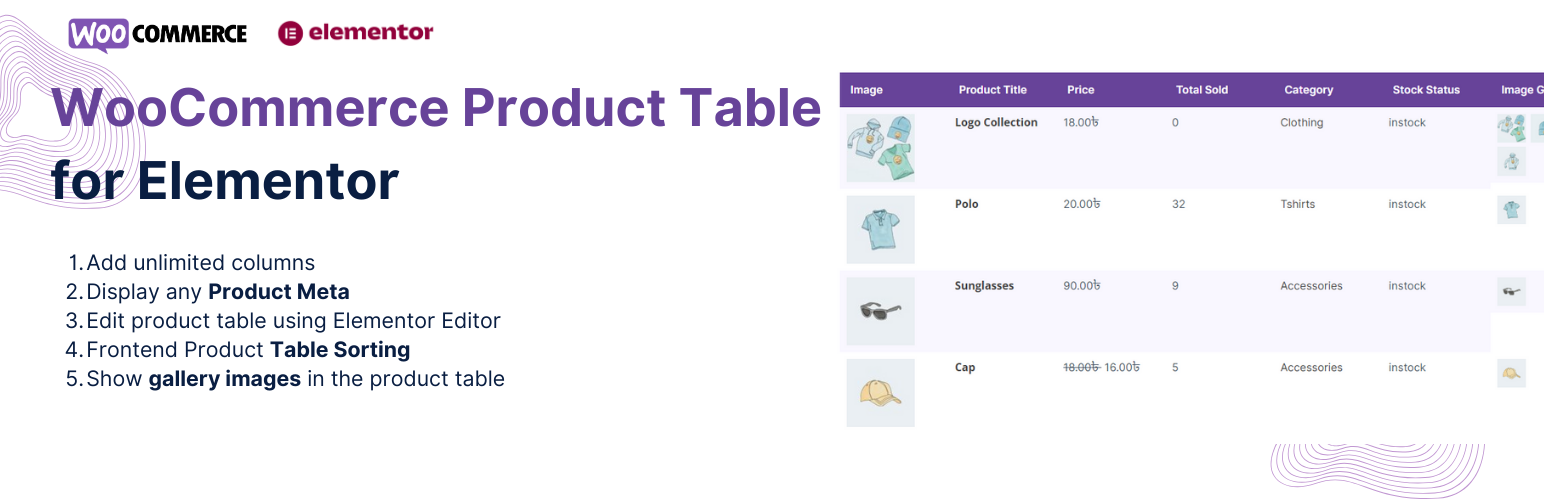
Responsive Product Table for WooCommerce and Elementor
The Product Table plugin lets you easily add customizable product tables to your WooCommerce store using Elementor. Instead of the default grid layout, you can show your products in a clean, easy-to-read table format, making it easier for customers to browse and shop from a single page.
UserElements
Free
-
JetWidgets for Elementor and WooCommerce
JetWidgets offers special widgets made just for WooCommerce sites, helping you display your products in clean and attractive layouts using Elementor. To use these widgets, you’ll need to have some WooCommerce products with prices, images, and assigned categories. Then, simply drag and drop the widget into your Elementor page. You can adjust layout settings like number of columns, product order, and filtering options.
Crocoblock
Free
-
CoDesigner
CoDesigner extends Elementor’s design power, letting you fully customize your shop pages, product filters, checkout experience, and more, all in just a few minutes. Building beautiful WooCommerce websites with Elementor is simple with CoDesigner. You don’t need to write any code, just use the easy drag-and-drop interface.
Codexpert, Inc
$49.99
-
ShopBuilder
ShopBuilder is a powerful tool that lets you design custom WooCommerce pages using Elementor’s drag-and-drop interface. It comes with a full set of WooCommerce widgets, making it easy to add and display products on your site.
RadiusTheme
$69
-
Ultimate Store Kit
Ultimate Store Kit is a powerful builder for WooCommerce and Easy Digital Downloads (EDD) that works seamlessly with Elementor. It puts you in full control of your store’s design. With over 80 advanced widgets and a flexible template builder, you can easily create custom product, cart, checkout, and account pages all without writing a single line of code.
bdthemes
$49.99
-
The Pack Elementor addon
The Pack adds 110+ unique elements and extensions to enhance your Elementor page-building experience. These easy-to-use tools give you more design options and help you create better-looking WordPress pages and posts faster and more easily.
webangon
$19
-
ShopPress
ShopPress is a complete WooCommerce builder plugin that helps you design your entire online store using Elementor or Gutenberg, all with just one plugin. Want to create fully custom WooCommerce pages using Elementor? ShopPress makes it simple. You can design product pages, cart pages, checkout pages, and more from scratch without relying on WooCommerce’s default layouts.
Climax Themes
$39
-
Shopready
ShopReady makes it easy to add dynamic WooCommerce widgets to any Elementor page. With this plugin, you can build a complete online store without writing a single line of code. ShopReady includes powerful features like Quick View, Product Comparison, Product Sliders, Custom Product Archive Builder, Sale Countdown, Variation Swatches, Product Gallery, Shopping Cart, Checkout, Wishlist, Currency Switcher, Floating Cart, and Secure Checkout Badges.
QuomodoSoft
$30
-
Elementor Connector for WooCommerce
Elementor Connector makes special widgets for the most popular WooCommerce plugins. It connects WooCommerce with Elementor so you can build better online stores. This is a premium add-on for WooCommerce. It helps shop owners, web designers, and agencies use Elementor widgets with different WooCommerce tools. With Elementor Connector, you get easy-to-use widgets that work with Elementor Pro, letting you design your WooCommerce store exactly how you want.
WPExtend
$49




How to Choose the Right WooCommerce Elementor Addon
The right addon depends on what you need to customise and how much you want to spend. Here
is a quick decision guide based on the most common store situations:
-
You want maximum widget coverage in one plugin: ShopLentor (105+ widgets,
$99/year) or Ultimate Store Kit (80+ widgets, $49.99/year). -
You need a full page template builder with ready-made designs: ShopEngine
($59/year) or ShopBuilder ($69/year) both include template libraries for every WooCommerce
page type. -
You want to redesign checkout specifically: CoDesigner and ShopLentor both
have strong checkout editors including custom field support and multi-step layouts. -
You’re on a tight budget: JetWidgets and the UserElements Product Table
are free. The Pack covers WooCommerce basics for $19/year. -
You use WooCommerce extensions (Subscriptions, Bookings): Elementor
Connector for WooCommerce is the only option on this list designed for that scenario. -
You manage both Elementor and Gutenberg client sites: ShopPress ($39/year)
is the only option here that actively supports both editors.
All the paid options above offer a free version or free trial on WordPress.org, so the
most reliable approach is to install the free version first, test it against your actual
product data, and upgrade only if the premium features justify the cost for your store.
Frequently Asked Questions
What is a WooCommerce Elementor addon?
A WooCommerce Elementor addon is a WordPress plugin that adds WooCommerce-specific widgets
to the Elementor page builder. Without these addons, Elementor can style general page
layouts but cannot control WooCommerce page templates like the shop archive, single product
page, cart, or checkout. WooCommerce Elementor addons bridge that gap by registering
dedicated widgets product grids, add-to-cart buttons, price displays, review sections
that pull live WooCommerce data and render inside the Elementor editor.
Do I need Elementor Pro to use these addons?
Most of the addons on this list work with the free version of Elementor, including
ShopLentor, ShopEngine, CoDesigner, ShopReady, and the UserElements Product Table plugin.
The exception is Elementor Connector for WooCommerce, which requires Elementor Pro because
it extends Pro’s dynamic content and theme builder features. If you are on the free
Elementor plan, all other options on this list are compatible.
Which WooCommerce Elementor addon has the most free widgets?
ShopLentor has the largest free widget set of any dedicated WooCommerce Elementor builder,
with a usable selection of product display, cart, and checkout widgets available without a
Pro licence. JetWidgets by Crocoblock and the UserElements Responsive Product Table are
also fully free. For general Elementor addons that include WooCommerce widgets as part of
a broader collection, Essential Addons for Elementor offers 10+ free WooCommerce widgets
alongside 95+ general widgets and has 2 million+ active installs.
Can I use more than one WooCommerce Elementor addon at the same time?
Technically yes, but it is not recommended. Running multiple WooCommerce Elementor builders
simultaneously increases the risk of CSS conflicts, duplicate widget names, and slower
editor load times. The practical approach is to pick one full-featured builder ShopLentor
or ShopEngine are the most comprehensive options and add the UserElements Product Table
plugin separately if you need the table display format, since it covers a specific use case
that most builders do not address.
Will these plugins slow down my WooCommerce store?
Performance impact varies by plugin. Plugins that load all widget assets globally
regardless of whether the page uses them add unnecessary CSS and JavaScript to every
page load. Better-coded addons use conditional or per-widget asset loading that only
enqueues scripts for widgets actually placed on the current page. Before committing to a
paid licence, check the plugin’s asset loading approach and run a quick PageSpeed Insights
test on a staging site with only the addon active.
What is the best free WooCommerce Elementor addon?
For a full-store builder with no cost, ShopLentor’s free version on WordPress.org is the
strongest option it covers product pages, shop archive, cart, and checkout with enough
widgets to build a functional store without paying. JetWidgets by Crocoblock is the best
free choice if you only need improved product grids and carousels rather than full page
template control. The UserElements Responsive Product Table is the best free option
specifically for table-format product listings.
The Bottom Line
For most WooCommerce stores on Elementor, ShopLentor is the default starting
point it has the largest active install base, the widest widget selection, and a
free version that is genuinely capable before you pay anything. ShopEngine is the best
alternative if you prioritise a structured template builder with dedicated page-type editors
and a team with a strong Elementor compatibility track record. Budget-first projects should
look at JetWidgets (free) or The Pack ($19/year). Stores with specific requirements EDD
support, dual Elementor/Gutenberg editing, or official WooCommerce extension integration
will find a better match in Ultimate Store Kit, ShopPress, or Elementor Connector
respectively.
All free versions are available on WordPress.org and worth installing before committing
to any paid licence. The best WooCommerce Elementor addon is the one that covers your
specific page template needs without adding widgets and modules you will never use.

- 13+ Widgets
- Live search
- AJAX filters & sorting
- View any user meta fields
- Ultimate Member Profile Fields
- WooCommerce User Data